1:"$Sreact.fragment"
2:I[27609,["/_next/static/chunks/677f3a926aff00c0.js","/_next/static/chunks/f61adf140310873c.js","/_next/static/chunks/7dd66bdf8a7e5707.js","/_next/static/chunks/e3d0602efd4a2158.js"],"default"]
3:I[19558,["/_next/static/chunks/677f3a926aff00c0.js","/_next/static/chunks/f61adf140310873c.js","/_next/static/chunks/7dd66bdf8a7e5707.js","/_next/static/chunks/e3d0602efd4a2158.js"],"default"]
4:I[83885,["/_next/static/chunks/677f3a926aff00c0.js","/_next/static/chunks/f61adf140310873c.js","/_next/static/chunks/7dd66bdf8a7e5707.js","/_next/static/chunks/e3d0602efd4a2158.js"],"default"]
5:I[39756,["/_next/static/chunks/677f3a926aff00c0.js","/_next/static/chunks/f61adf140310873c.js","/_next/static/chunks/7dd66bdf8a7e5707.js","/_next/static/chunks/e3d0602efd4a2158.js"],"default"]
6:I[37457,["/_next/static/chunks/677f3a926aff00c0.js","/_next/static/chunks/f61adf140310873c.js","/_next/static/chunks/7dd66bdf8a7e5707.js","/_next/static/chunks/e3d0602efd4a2158.js"],"default"]
7:I[74964,["/_next/static/chunks/677f3a926aff00c0.js","/_next/static/chunks/f61adf140310873c.js","/_next/static/chunks/7dd66bdf8a7e5707.js","/_next/static/chunks/e3d0602efd4a2158.js"],"default"]
8:I[95080,["/_next/static/chunks/677f3a926aff00c0.js","/_next/static/chunks/f61adf140310873c.js","/_next/static/chunks/7dd66bdf8a7e5707.js","/_next/static/chunks/e3d0602efd4a2158.js"],"default"]
9:I[30765,["/_next/static/chunks/677f3a926aff00c0.js","/_next/static/chunks/f61adf140310873c.js","/_next/static/chunks/7dd66bdf8a7e5707.js","/_next/static/chunks/e3d0602efd4a2158.js"],"default"]
b:I[97367,["/_next/static/chunks/677f3a926aff00c0.js","/_next/static/chunks/f61adf140310873c.js","/_next/static/chunks/7dd66bdf8a7e5707.js","/_next/static/chunks/e3d0602efd4a2158.js"],"OutletBoundary"]
d:I[11533,["/_next/static/chunks/677f3a926aff00c0.js","/_next/static/chunks/f61adf140310873c.js","/_next/static/chunks/7dd66bdf8a7e5707.js","/_next/static/chunks/e3d0602efd4a2158.js"],"AsyncMetadataOutlet"]
f:I[97367,["/_next/static/chunks/677f3a926aff00c0.js","/_next/static/chunks/f61adf140310873c.js","/_next/static/chunks/7dd66bdf8a7e5707.js","/_next/static/chunks/e3d0602efd4a2158.js"],"ViewportBoundary"]
11:I[97367,["/_next/static/chunks/677f3a926aff00c0.js","/_next/static/chunks/f61adf140310873c.js","/_next/static/chunks/7dd66bdf8a7e5707.js","/_next/static/chunks/e3d0602efd4a2158.js"],"MetadataBoundary"]
12:"$Sreact.suspense"
14:I[68027,["/_next/static/chunks/677f3a926aff00c0.js","/_next/static/chunks/f61adf140310873c.js","/_next/static/chunks/7dd66bdf8a7e5707.js","/_next/static/chunks/e3d0602efd4a2158.js"],"default"]
:HL["/_next/static/chunks/6e7ad99bb9b82dbd.css","style"]
:HL["/_next/static/media/a98486ef7c5f003f-s.p.6230313c.woff2","font",{"crossOrigin":"","type":"font/woff2"}]
0:{"P":null,"b":"8EwmKOSrLCB2_oQmKx7ds","p":"","c":["","blog","how-to-fix-blue-screen-and-black-screen-error-in-rdp"],"i":false,"f":[[["",{"children":["blog",{"children":[["slug","how-to-fix-blue-screen-and-black-screen-error-in-rdp","d"],{"children":["__PAGE__",{}]}]}]},"$undefined","$undefined",true],["",["$","$1","c",{"children":[[["$","link","0",{"rel":"stylesheet","href":"/_next/static/chunks/6e7ad99bb9b82dbd.css","precedence":"next","crossOrigin":"$undefined","nonce":"$undefined"}],["$","script","script-0",{"src":"/_next/static/chunks/677f3a926aff00c0.js","async":true,"nonce":"$undefined"}],["$","script","script-1",{"src":"/_next/static/chunks/f61adf140310873c.js","async":true,"nonce":"$undefined"}],["$","script","script-2",{"src":"/_next/static/chunks/7dd66bdf8a7e5707.js","async":true,"nonce":"$undefined"}],["$","script","script-3",{"src":"/_next/static/chunks/e3d0602efd4a2158.js","async":true,"nonce":"$undefined"}]],["$","html",null,{"lang":"en","children":["$","body",null,{"className":"antialiased wix_madefor_display_2358a5a5-module__w0qNTW__variable","children":[["$","script",null,{"type":"application/ld+json","dangerouslySetInnerHTML":{"__html":"[{\"@context\":\"https://schema.org\",\"@type\":\"Organization\",\"name\":\"Buy RDP Live\",\"url\":\"https://www.buyrdplive.com\",\"logo\":{\"@type\":\"ImageObject\",\"url\":\"https://www.buyrdplive.com/images/brand-logo.png\"},\"sameAs\":[\"https://www.facebook.com\",\"https://www.instagram.com/buyrdplive/\",\"https://twitter.com/?lang=en\",\"https://t.me/rdpsupport\",\"http://bit.ly/rdpsupport\"]},{\"@context\":\"https://schema.org\",\"@type\":\"WebSite\",\"name\":\"Buy RDP Live\",\"url\":\"https://www.buyrdplive.com\",\"potentialAction\":{\"@type\":\"SearchAction\",\"target\":\"https://www.buyrdplive.com/search?q={search_term_string}\",\"query-input\":\"required name=search_term_string\"}}]"}}],["$","$L2",null,{"children":[["$","$L3",null,{}],["$","$L4",null,{}],["$","main",null,{"children":["$","$L5",null,{"parallelRouterKey":"children","error":"$undefined","errorStyles":"$undefined","errorScripts":"$undefined","template":["$","$L6",null,{}],"templateStyles":"$undefined","templateScripts":"$undefined","notFound":[[["$","title",null,{"children":"404: This page could not be found."}],["$","div",null,{"style":{"fontFamily":"system-ui,\"Segoe UI\",Roboto,Helvetica,Arial,sans-serif,\"Apple Color Emoji\",\"Segoe UI Emoji\"","height":"100vh","textAlign":"center","display":"flex","flexDirection":"column","alignItems":"center","justifyContent":"center"},"children":["$","div",null,{"children":[["$","style",null,{"dangerouslySetInnerHTML":{"__html":"body{color:#000;background:#fff;margin:0}.next-error-h1{border-right:1px solid rgba(0,0,0,.3)}@media (prefers-color-scheme:dark){body{color:#fff;background:#000}.next-error-h1{border-right:1px solid rgba(255,255,255,.3)}}"}}],["$","h1",null,{"className":"next-error-h1","style":{"display":"inline-block","margin":"0 20px 0 0","padding":"0 23px 0 0","fontSize":24,"fontWeight":500,"verticalAlign":"top","lineHeight":"49px"},"children":404}],["$","div",null,{"style":{"display":"inline-block"},"children":["$","h2",null,{"style":{"fontSize":14,"fontWeight":400,"lineHeight":"49px","margin":0},"children":"This page could not be found."}]}]]}]}]],[]],"forbidden":"$undefined","unauthorized":"$undefined"}]}],["$","$L7",null,{}],["$","$L8",null,{}],["$","$L9",null,{}]]}]]}]}]]}],{"children":["blog",["$","$1","c",{"children":[null,["$","$L5",null,{"parallelRouterKey":"children","error":"$undefined","errorStyles":"$undefined","errorScripts":"$undefined","template":["$","$L6",null,{}],"templateStyles":"$undefined","templateScripts":"$undefined","notFound":"$undefined","forbidden":"$undefined","unauthorized":"$undefined"}]]}],{"children":[["slug","how-to-fix-blue-screen-and-black-screen-error-in-rdp","d"],["$","$1","c",{"children":[null,["$","$L5",null,{"parallelRouterKey":"children","error":"$undefined","errorStyles":"$undefined","errorScripts":"$undefined","template":["$","$L6",null,{}],"templateStyles":"$undefined","templateScripts":"$undefined","notFound":"$undefined","forbidden":"$undefined","unauthorized":"$undefined"}]]}],{"children":["__PAGE__",["$","$1","c",{"children":["$La",[["$","script","script-0",{"src":"/_next/static/chunks/b7f9da7e5e4a8f0e.js","async":true,"nonce":"$undefined"}],["$","script","script-1",{"src":"/_next/static/chunks/c18586060233424a.js","async":true,"nonce":"$undefined"}]],["$","$Lb",null,{"children":["$Lc",["$","$Ld",null,{"promise":"$@e"}]]}]]}],{},null,false]},null,false]},null,false]},null,false],["$","$1","h",{"children":[null,[["$","$Lf",null,{"children":"$L10"}],["$","meta",null,{"name":"next-size-adjust","content":""}]],["$","$L11",null,{"children":["$","div",null,{"hidden":true,"children":["$","$12",null,{"fallback":null,"children":"$L13"}]}]}]]}],false]],"m":"$undefined","G":["$14",[["$","link","0",{"rel":"stylesheet","href":"/_next/static/chunks/6e7ad99bb9b82dbd.css","precedence":"next","crossOrigin":"$undefined","nonce":"$undefined"}]]],"s":false,"S":true}
16:I[30663,["/_next/static/chunks/677f3a926aff00c0.js","/_next/static/chunks/f61adf140310873c.js","/_next/static/chunks/7dd66bdf8a7e5707.js","/_next/static/chunks/e3d0602efd4a2158.js","/_next/static/chunks/b7f9da7e5e4a8f0e.js","/_next/static/chunks/c18586060233424a.js"],"default"]
15:T7ee,[{"@context":"https://schema.org","@type":"WebPage","name":"How To Fix Blue Screen & Black Screen Error In RDP? | BuyRDPLive Blog","url":"https://www.buyrdplive.com/blog/how-to-fix-blue-screen-and-black-screen-error-in-rdp","description":"Learn how to fix blue screen and black screen errors in Windows Server RDP. Get step-by-step instructions to resolve these common RDP connection issues and regain access to your account.","isPartOf":{"@type":"WebSite","name":"Buy RDP Live","url":"https://www.buyrdplive.com"},"breadcrumb":{"@type":"BreadcrumbList","itemListElement":[{"@type":"ListItem","position":1,"name":"Home","item":"https://www.buyrdplive.com/"},{"@type":"ListItem","position":2,"name":"RDP Blog","item":"https://www.buyrdplive.com/blog"},{"@type":"ListItem","position":3,"name":"How To Fix Blue Screen & Black Screen Error In RDP?","item":"https://www.buyrdplive.com/blog/how-to-fix-blue-screen-and-black-screen-error-in-rdp"}]}},{"@context":"https://schema.org","@type":"BlogPosting","headline":"How To Fix Blue Screen & Black Screen Error In RDP?","description":"Learn how to fix blue screen and black screen errors in Windows Server RDP. Get step-by-step instructions to resolve these common RDP connection issues and regain access to your account.","image":["https://www.buyrdplive.com/images/blog-img21.jpg"],"url":"https://www.buyrdplive.com/blog/how-to-fix-blue-screen-and-black-screen-error-in-rdp","mainEntityOfPage":"https://www.buyrdplive.com/blog/how-to-fix-blue-screen-and-black-screen-error-in-rdp","datePublished":"2025-07-23T00:00:00.000Z","dateModified":"2025-07-23T00:00:00.000Z","articleSection":"Tutorials","keywords":"RDP Troubleshooting, Blue Screen Error, Black Screen Error, RDP Fix, Windows Server, RDP Error, RDP Support","author":[{"@type":"Person","name":"Admin","url":"https://www.buyrdplive.com/about"}],"publisher":{"@type":"Organization","name":"Buy RDP Live","url":"https://www.buyrdplive.com","logo":{"@type":"ImageObject","url":"https://www.buyrdplive.com/images/brand-logo.png"}}}]17:T855,
How to fix blue screen error in Windows Server 2008/2012/2012 R2? In Windows Server 2008/2012/2012 R2, a blue screen error appears. And in Windows Server 2016, a black screen error appears. Then you're not able to access your account. But now you can fix this error by yourself with simple 2 steps.
Method 1: Using Client Area
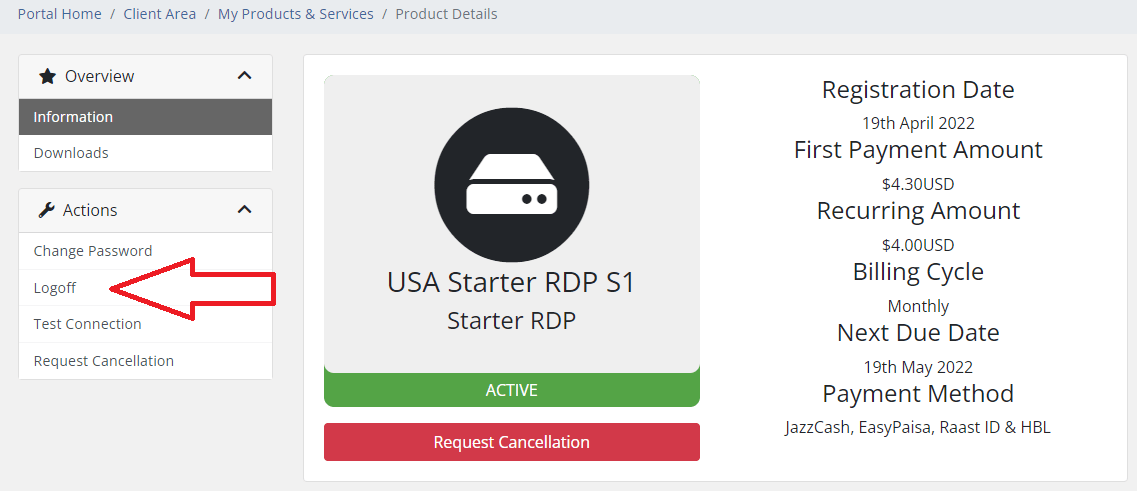
Go to the client area Products & Services page, then select the RDP which is not working.
Now see at the left sidebar and find the Logoff button. Click on it and you're done.
Alternative Method
-
First of all, connect to your RDP
-
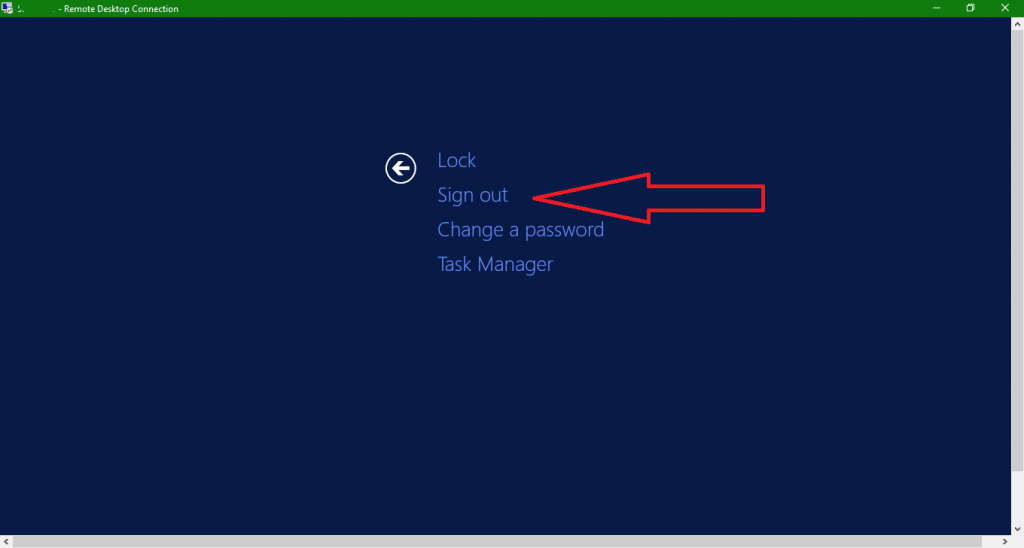
Then press CTRL+ALT+END
-
Click on Sign Out
-
Done. Now login again and the error is fixed :)
These simple steps should resolve the blue screen or black screen error in your RDP connection. If the problem persists, please contact our support team for further assistance.
a:[["$","script",null,{"type":"application/ld+json","dangerouslySetInnerHTML":{"__html":"$15"}}],["$","$L16",null,{"post":{"slug":"how-to-fix-blue-screen-and-black-screen-error-in-rdp","title":"How To Fix Blue Screen & Black Screen Error In RDP?","excerpt":"Learn how to fix blue screen and black screen errors in Windows Server RDP. Get step-by-step instructions to resolve these common RDP connection issues and regain access to your account.","content":"$17","image":"/images/blog-img21.jpg","author":"Admin","date":"2025-07-23","category":"Tutorials","tags":["RDP Troubleshooting","Blue Screen Error","Black Screen Error","RDP Fix","Windows Server","RDP Error","RDP Support"],"readTime":"5 min read"}}]]
10:[["$","meta","0",{"charSet":"utf-8"}],["$","meta","1",{"name":"viewport","content":"width=device-width, initial-scale=1"}]]
c:null
18:I[27201,["/_next/static/chunks/677f3a926aff00c0.js","/_next/static/chunks/f61adf140310873c.js","/_next/static/chunks/7dd66bdf8a7e5707.js","/_next/static/chunks/e3d0602efd4a2158.js"],"IconMark"]
e:{"metadata":[["$","title","0",{"children":"How To Fix Blue Screen & Black Screen Error In RDP? | BuyRDPLive Blog"}],["$","meta","1",{"name":"description","content":"Learn how to fix blue screen and black screen errors in Windows Server RDP. Get step-by-step instructions to resolve these common RDP connection issues and regain access to your account. Learn more about RDP hosting, remote desktop performance, and secure server management in this BuyRDPLive blog article."}],["$","link","2",{"rel":"manifest","href":"/site.webmanifest","crossOrigin":"$undefined"}],["$","meta","3",{"name":"robots","content":"index, follow"}],["$","meta","4",{"name":"googlebot","content":"index, follow"}],["$","link","5",{"rel":"canonical","href":"https://www.buyrdplive.com/blog/how-to-fix-blue-screen-and-black-screen-error-in-rdp"}],["$","meta","6",{"property":"og:title","content":"How To Fix Blue Screen & Black Screen Error In RDP? | BuyRDPLive Blog"}],["$","meta","7",{"property":"og:description","content":"Learn how to fix blue screen and black screen errors in Windows Server RDP. Get step-by-step instructions to resolve these common RDP connection issues and regain access to your account. Learn more about RDP hosting, remote desktop performance, and secure server management in this BuyRDPLive blog article."}],["$","meta","8",{"property":"og:url","content":"https://www.buyrdplive.com/blog/how-to-fix-blue-screen-and-black-screen-error-in-rdp"}],["$","meta","9",{"property":"og:site_name","content":"Buy RDP Live"}],["$","meta","10",{"property":"og:image","content":"https://www.buyrdplive.com/images/blog-img21.jpg"}],["$","meta","11",{"property":"og:image:width","content":"1200"}],["$","meta","12",{"property":"og:image:height","content":"630"}],["$","meta","13",{"property":"og:image:alt","content":"How To Fix Blue Screen & Black Screen Error In RDP?"}],["$","meta","14",{"property":"og:type","content":"article"}],["$","meta","15",{"name":"twitter:card","content":"summary_large_image"}],["$","meta","16",{"name":"twitter:title","content":"How To Fix Blue Screen & Black Screen Error In RDP? | BuyRDPLive Blog"}],["$","meta","17",{"name":"twitter:description","content":"Learn how to fix blue screen and black screen errors in Windows Server RDP. Get step-by-step instructions to resolve these common RDP connection issues and regain access to your account. Learn more about RDP hosting, remote desktop performance, and secure server management in this BuyRDPLive blog article."}],["$","meta","18",{"name":"twitter:image","content":"https://www.buyrdplive.com/images/blog-img21.jpg"}],["$","link","19",{"rel":"shortcut icon","href":"/favicon.ico"}],["$","link","20",{"rel":"icon","href":"/favicon-32x32.png","type":"image/png","sizes":"32x32"}],["$","link","21",{"rel":"icon","href":"/favicon-16x16.png","type":"image/png","sizes":"16x16"}],["$","link","22",{"rel":"icon","href":"/apple-touch-icon.png","sizes":"180x180"}],["$","link","23",{"rel":"apple-touch-icon","href":"/apple-touch-icon.png"}],["$","$L18","24",{}]],"error":null,"digest":"$undefined"}
13:"$e:metadata"