Best VPS Servers 2026 🥳•VPS Servers for Linux & VPS Servers for Windows•VPS for Gaming Servers•Cheap Servers With Great Performance👍•Dedicated Servers with Private Location•Online Streaming RDP•Supersonic-VPS & Hypersonic-VPS•Streaming RDP•Android Emulator RDP•Python RDP•Forex Trading RDP•Cheap RDP•Instant RDP•Admin Access RDP•Full Root Access•Windows 10 RDP•Windows 11 RDP•Ubuntu RDP•Linux RDP•USA RDP•UK RDP•Buy RDP Online•Dedicated RDP Server•AI RDP•Windows VPS•Secure RDP•24/7 RDP Hosting•Low Latency RDP•CentOS RDP•Debian RDP•Windows Server RDP•Buy RDP with USDT•Buy RDP with JazzCash•Buy RDP with Easypaisa•Buy RDP•Windows RDP•Dedicated RDP•VPS RDP•GPU RDP•Stable Diffusion RDP•ComfyUI RDP•AUTOMATIC1111 RDP•New York RDP•London RDP•Singapore RDP•Tokyo RDP•Frankfurt RDP•Amsterdam RDP•Los Angeles RDP•Chicago RDP•Dedicated IP RDP•Unmetered Bandwidth•99.9% Uptime•DDoS Protection•NVMe SSD Storage•Instant Activation•24/7 Support•Remote Desktop Server•Cloud RDPBest VPS Servers 2026 🥳•VPS Servers for Linux & VPS Servers for Windows•VPS for Gaming Servers•Cheap Servers With Great Performance👍•Dedicated Servers with Private Location•Online Streaming RDP•Supersonic-VPS & Hypersonic-VPS•Streaming RDP•Android Emulator RDP•Python RDP•Forex Trading RDP•Cheap RDP•Instant RDP•Admin Access RDP•Full Root Access•Windows 10 RDP•Windows 11 RDP•Ubuntu RDP•Linux RDP•USA RDP•UK RDP•Buy RDP Online•Dedicated RDP Server•AI RDP•Windows VPS•Secure RDP•24/7 RDP Hosting•Low Latency RDP•CentOS RDP•Debian RDP•Windows Server RDP•Buy RDP with USDT•Buy RDP with JazzCash•Buy RDP with Easypaisa•Buy RDP•Windows RDP•Dedicated RDP•VPS RDP•GPU RDP•Stable Diffusion RDP•ComfyUI RDP•AUTOMATIC1111 RDP•New York RDP•London RDP•Singapore RDP•Tokyo RDP•Frankfurt RDP•Amsterdam RDP•Los Angeles RDP•Chicago RDP•Dedicated IP RDP•Unmetered Bandwidth•99.9% Uptime•DDoS Protection•NVMe SSD Storage•Instant Activation•24/7 Support•Remote Desktop Server•Cloud RDP
Buy RDP Live logo
Tutorials

How To Change IDM Download Location In RDP - Most Important Setup For All RDP Users

Admin
July 22, 2025
4 min read
How To Change IDM Download Location In RDP - Most Important Setup For All RDP Users

Changing the download location in IDM (Internet Download Manager) is crucial for RDP users to manage disk space and organize files efficiently. Follow these simple steps to configure your IDM download settings.

Step-by-Step Guide:

  1. Open IDM
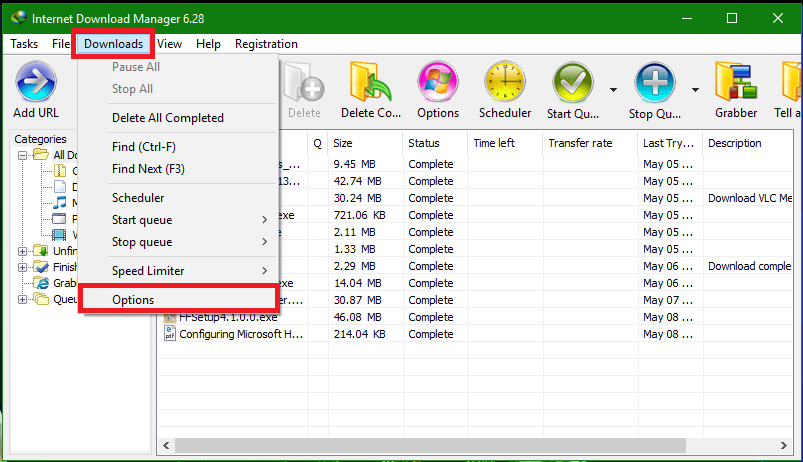
  2. Go to Downloads >> Options
IDM Options Menu
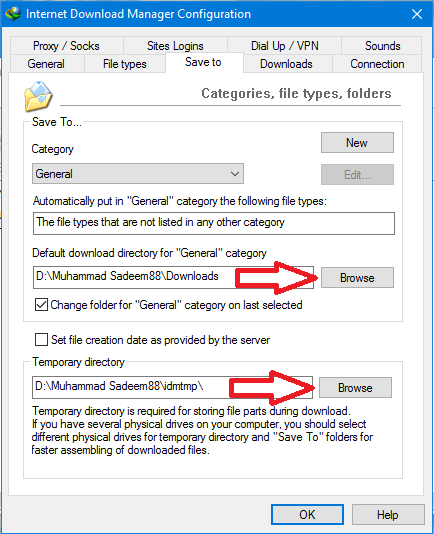
  1. Then go to the "Save To" tab and change the download location for all categories
  2. Now change the temp download location
IDM Save To Settings
  1. Done!

For uTorrent/BitTorrent/qBitTorrent Etc:

If you're using uTorrent, BitTorrent, qBitTorrent, or similar torrent clients, you can also change their download locations. See the image below for reference:
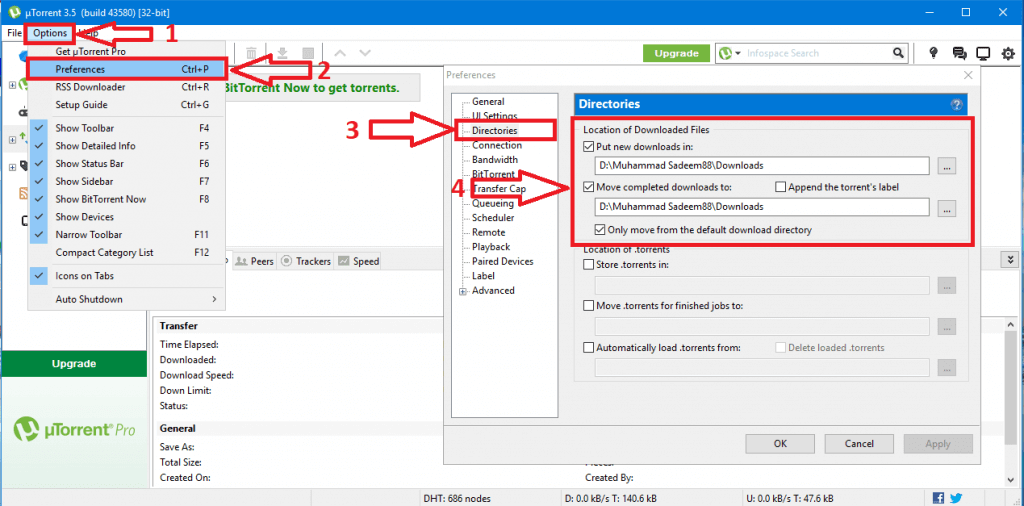
Torrent Download Location Settings

Pro Tip: Always set your download location to a drive with sufficient space. This helps prevent disk space issues and keeps your RDP running smoothly. If you need help configuring these settings, feel free to contact our support team.
Tags