Best VPS Servers 2026 🥳•VPS Servers for Linux & VPS Servers for Windows•VPS for Gaming Servers•Cheap Servers With Great Performance👍•Dedicated Servers with Private Location•Online Streaming RDP•Supersonic-VPS & Hypersonic-VPS•Streaming RDP•Android Emulator RDP•Python RDP•Forex Trading RDP•Cheap RDP•Instant RDP•Admin Access RDP•Full Root Access•Windows 10 RDP•Windows 11 RDP•Ubuntu RDP•Linux RDP•USA RDP•UK RDP•Buy RDP Online•Dedicated RDP Server•AI RDP•Windows VPS•Secure RDP•24/7 RDP Hosting•Low Latency RDP•CentOS RDP•Debian RDP•Windows Server RDP•Buy RDP with USDT•Buy RDP with JazzCash•Buy RDP with Easypaisa•Buy RDP•Windows RDP•Dedicated RDP•VPS RDP•GPU RDP•Stable Diffusion RDP•ComfyUI RDP•AUTOMATIC1111 RDP•New York RDP•London RDP•Singapore RDP•Tokyo RDP•Frankfurt RDP•Amsterdam RDP•Los Angeles RDP•Chicago RDP•Dedicated IP RDP•Unmetered Bandwidth•99.9% Uptime•DDoS Protection•NVMe SSD Storage•Instant Activation•24/7 Support•Remote Desktop Server•Cloud RDPBest VPS Servers 2026 🥳•VPS Servers for Linux & VPS Servers for Windows•VPS for Gaming Servers•Cheap Servers With Great Performance👍•Dedicated Servers with Private Location•Online Streaming RDP•Supersonic-VPS & Hypersonic-VPS•Streaming RDP•Android Emulator RDP•Python RDP•Forex Trading RDP•Cheap RDP•Instant RDP•Admin Access RDP•Full Root Access•Windows 10 RDP•Windows 11 RDP•Ubuntu RDP•Linux RDP•USA RDP•UK RDP•Buy RDP Online•Dedicated RDP Server•AI RDP•Windows VPS•Secure RDP•24/7 RDP Hosting•Low Latency RDP•CentOS RDP•Debian RDP•Windows Server RDP•Buy RDP with USDT•Buy RDP with JazzCash•Buy RDP with Easypaisa•Buy RDP•Windows RDP•Dedicated RDP•VPS RDP•GPU RDP•Stable Diffusion RDP•ComfyUI RDP•AUTOMATIC1111 RDP•New York RDP•London RDP•Singapore RDP•Tokyo RDP•Frankfurt RDP•Amsterdam RDP•Los Angeles RDP•Chicago RDP•Dedicated IP RDP•Unmetered Bandwidth•99.9% Uptime•DDoS Protection•NVMe SSD Storage•Instant Activation•24/7 Support•Remote Desktop Server•Cloud RDP
Buy RDP Live logo
Tutorials

How To Fix Blue Screen & Black Screen Error In RDP?

Admin
July 22, 2025
5 min read
How To Fix Blue Screen & Black Screen Error In RDP?

How to fix blue screen error in Windows Server 2008/2012/2012 R2? In Windows Server 2008/2012/2012 R2, a blue screen error appears. And in Windows Server 2016, a black screen error appears. Then you're not able to access your account. But now you can fix this error by yourself with simple 2 steps.

Method 1: Using Client Area

Go to the client area Products & Services page, then select the RDP which is not working.

Now see at the left sidebar and find the Logoff button. Click on it and you're done.
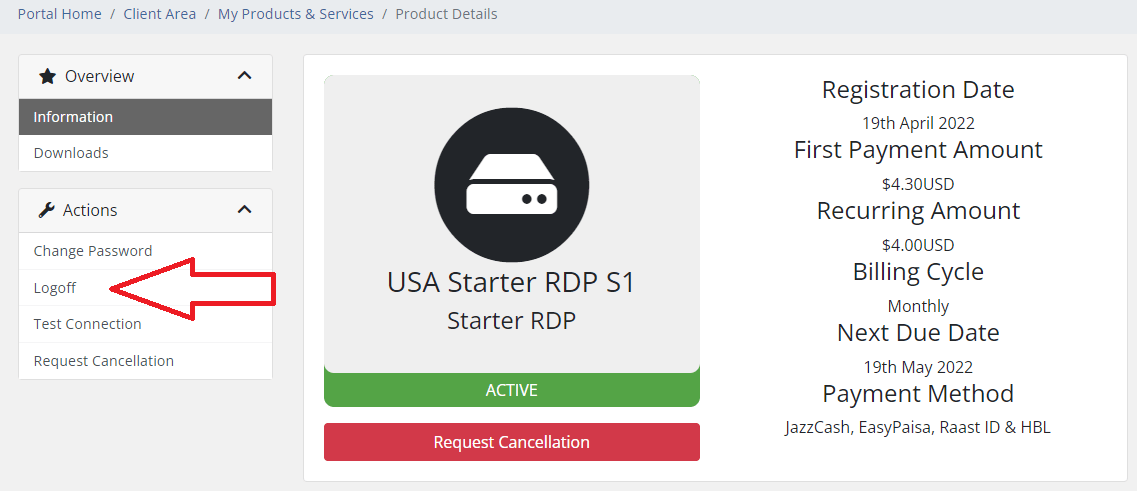
RDP Client Area Logoff

Alternative Method

  1. First of all, connect to your RDP
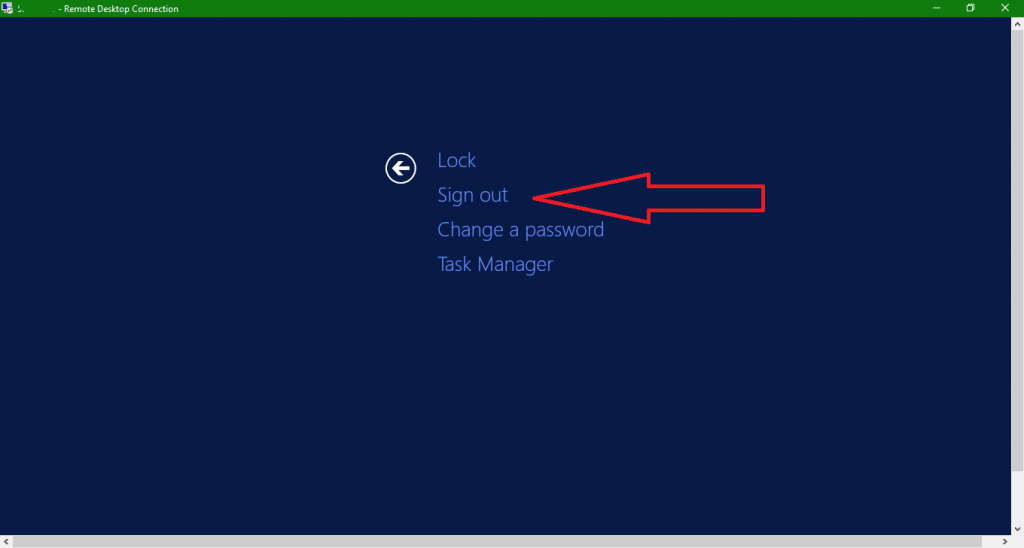
  2. Then press CTRL+ALT+END
RDP Sign Out Screen
  1. Click on Sign Out
  2. Done. Now login again and the error is fixed :)

These simple steps should resolve the blue screen or black screen error in your RDP connection. If the problem persists, please contact our support team for further assistance.
Tags